
Timbank /5 distributes the employee's weekly working hours across Monday to Friday. Timbank /7 distributes the same weekly working hours across all seven calendar days. Therefore, the models can give different plus or minus values on an individual day, even if the total expected time over a full week is the same.
The choice is made under Timbank type on the deviation code of type Timbank time linked to the agreement. The choice applies to all employees using the agreement. It determines how Timeplan calculates the expected time for the day – not which days the business is open.
Timeplan starts from the employee's weekly working hours and distributes them according to the chosen model. The day's timbank-qualifying time is then compared with the day's expected time.
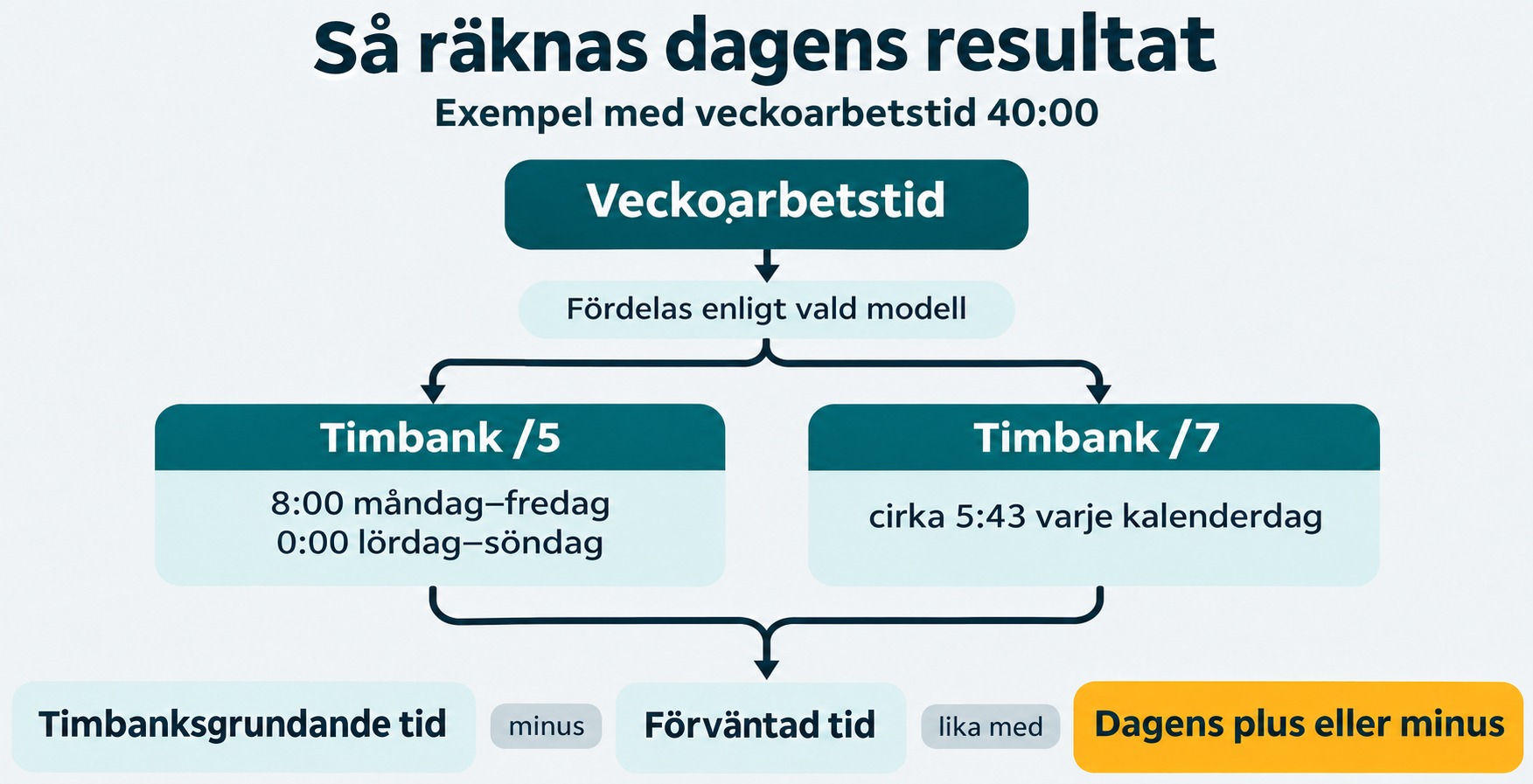
The timbank-qualifying time is retrieved from accounts in the system account group Accounts for Timbank calculation. The time must also meet conditions regarding, among other things, approval status and shift type. An unexpected daily result therefore does not necessarily mean the wrong model is chosen.
The difference is most clearly seen in how the expected time is distributed:
- Distribution: Timbank /5 divides the weekly working time by five. Timbank /7 divides it by seven.
- Days with expected time: Timbank /5 assigns expected time Monday to Friday. Timbank /7 assigns it to all calendar days.
- Saturday and Sunday: Timbank /5 has no expected time from the model. Timbank /7 has the same daily expectation as on weekdays.
- 40 hours per week: Timbank /5 gives 8:00 per weekday. Timbank /7 gives about 5:43 per calendar day.
- 8:00 timbank-qualifying time: Timbank /5 results in 0:00 on a weekday and +8:00 on the weekend. Timbank /7 gives about +2:17 regardless of the weekday.
- No timbank-qualifying time: Timbank /5 gives −8:00 on a weekday and 0:00 on the weekend. Timbank /7 gives about −5:43 regardless of the weekday.
Examples assume the time is timbank-qualifying and approved, and that the day is not a public holiday or shortened exceptional date.
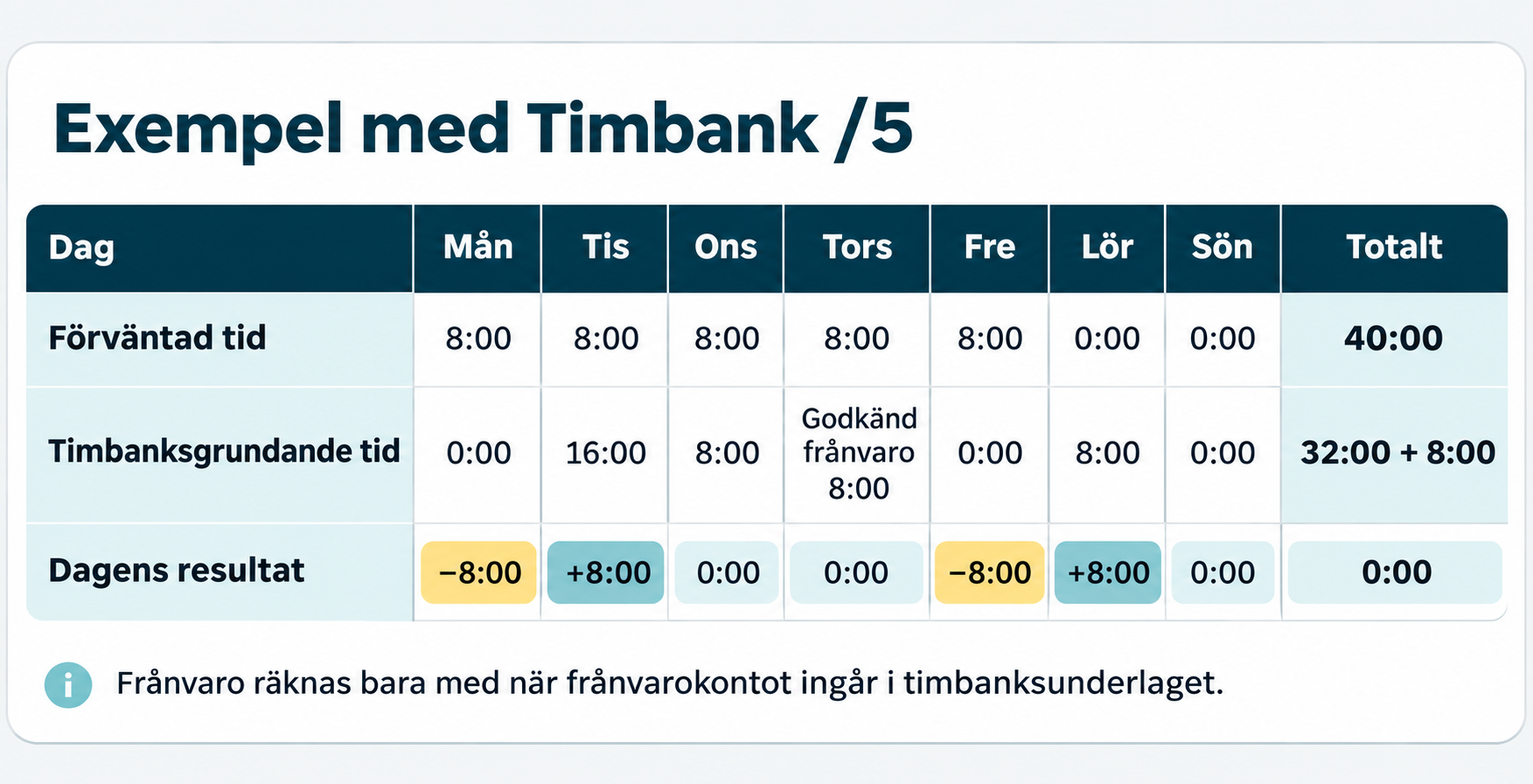
With Weekly working hours / 5, the weekly working time is spread over five weekdays. An employee with 40 hours weekly working time will therefore have 8:00 expected time Monday to Friday and 0:00 on Saturday and Sunday.
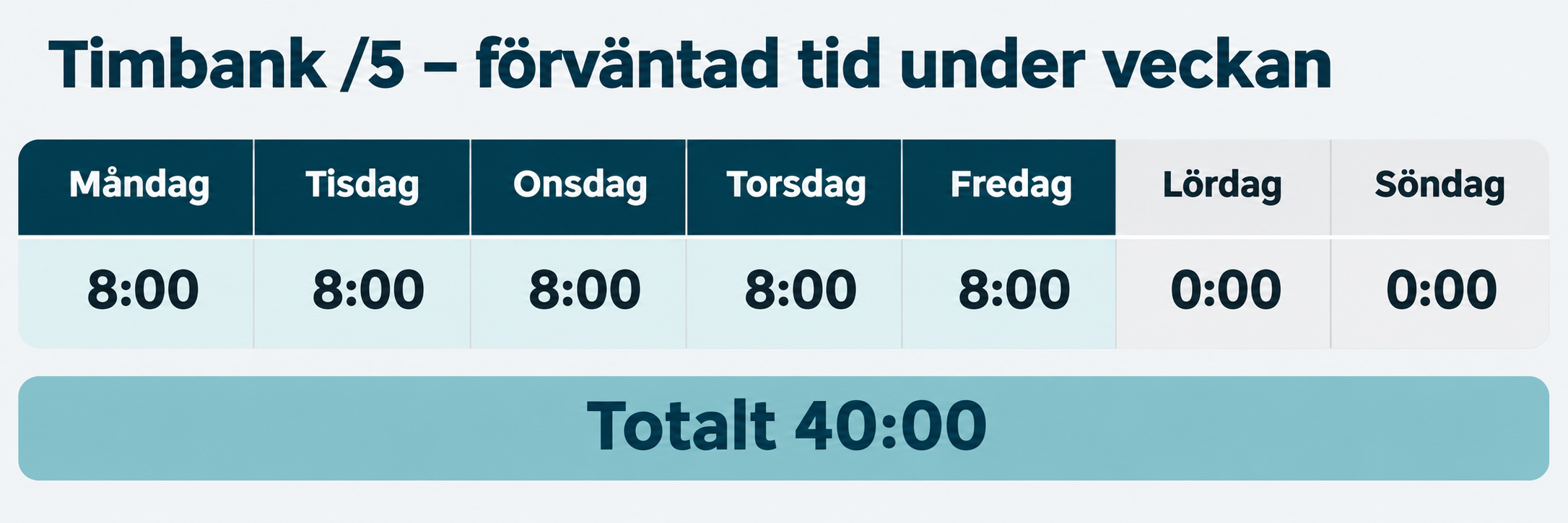
If the employee works 16:00 on Tuesday, the day’s result is +8:00. If there is no timbank-qualifying time on Monday, the result is −8:00. On Saturday, the model’s expected time is 0:00, so 8:00 timbank-qualifying time results in +8:00.
With Weekly working hours / 7, the weekly working time is spread over all seven calendar days. For an employee with 40 hours weekly working time, the daily expectation is 5:42:51 before rounding, approximately 5 hours and 43 minutes every day.
If 8:00 is counted for the day, the day’s result is about +2:17. If no time is counted, the result is approximately −5:43. This also applies on Saturday and Sunday, since the model assigns expected time every calendar day.
- Timbank base: Only accounts included in the system account group Accounts for Timbank calculation contribute to the calculated time.
- Approval status: Time still requiring approval is not treated as approved time in the comparison.
- Shift type: Results from shifts with Extended or None are not included. Regular shifts may be included when other conditions are met.
- Public holidays: On a defined public holiday, expected time is only created when Create shifts from base schedule on public holidays is enabled.
- Shortened days: A shortening in the day profile can reduce the expected time on the specific date.
- Absence: Absence is not automatically counted just because it is registered. The absence account must be included in the timbank base, and the record must meet other conditions.
Pick the model based on how the expected time should be distributed for employees on the agreement:
- Choose Timbank /5 when the weekly working time should be distributed Monday to Friday.
- Choose Timbank /7 when the weekly working time should be distributed over all calendar days.
Seven-day operation does not automatically mean Timbank /7 is correct. The choice should reflect how expected time is calculated for the employees, not just which days the business is open.
Do not switch model solely to correct an unexpected result on a single day. First check the agreement linkage, timbank code, accounts in the timbank base, approval status, shift type, public holiday settings and day profile.
- Compare the different variants of Timbank describes all five choices under Timbank type.
- Deviation codes contains Type: Timbank time, the account and Timbank type choice.
- System account groups control which accounts are included in the timbank base.
- Agreement settings contains the public holiday choice that affects expected time.
- Day profiles can shorten expected time on exceptional dates.
- Timbank balances shows timbank records within the chosen period.
No. The model distributes expected time over all calendar days. It should only be used when that matches the calculation you want for the employees on the agreement.
The model assigns a seventh of the weekly working hours as expectation on each calendar day. If no timbank-qualifying time is counted on the day, the result is therefore negative.
The model has no expected time on Saturday and Sunday. Timbank-qualifying time on the weekend therefore becomes positive time in the daily comparison.
Check that the absence account is included in Accounts for Timbank calculation, that the record has the correct approval status and that the shift type is allowed in the calculation.
No. The model is chosen on the timbank code linked to the agreement and applies to all employees using the agreement.